
A Facebook ads audit is a structured review of your ad account, measurement, and customer journey. Start by recording the business goal and current results. Then verify tracking, inspect campaign settings and creative, and follow the action through to the sale, lead, or visit you wanted. Finish with a list of findings, evidence, owners, and next steps.
The useful outcome is a decision you can explain. A broken destination needs a fix. A new ad with no purchases may need more evidence. A campaign meeting its purpose may need no change.
Use these 18 checks to review existing Facebook and Instagram campaigns, including boosted posts. Adapt the checks to the campaign's job: website sales, lead generation, traffic, and engagement require different evidence.
Before the audit: define the goal and save a baseline
1. Confirm access and ownership. Check that you are inspecting the intended ad account, Page, Instagram account, and connected data sources. Identify who can approve and make changes. Request the access needed to inspect them; an audit does not automatically require administrative control. Record anything you cannot inspect.
2. Check account settings and delivery warnings. Note the account's currency and reporting time zone. Inspect restrictions, billing problems, and delivery warnings that could explain missing or interrupted activity. Separate an inability to deliver from poor results after delivery.
3. Write down what success means. Record the business outcome, the result shown in Ads Manager, and the cost or quality target the business has chosen. “More leads” is incomplete if nobody has defined which leads are useful.
Save a report with the date range, spend, results, cost per result, delivery status, and attribution context before editing anything. Choose comparison periods that account for promotions, seasonality, and the time customers take to act. Recent leads also need time for comparable follow-up.
Have the relevant evidence ready: Ads Manager settings and reports, Events Manager where applicable, exact ad destinations, website analytics, order or CRM records, and any promotion rules. For a native lead form, inspect submission and handoff records. For an engagement campaign, start with the intended engagement outcome; website purchase tracking may be irrelevant.
Facebook ads checklist: 18 checks at a glance
Use this table while the account is open. “Where to look” identifies the evidence source; interface labels can vary by account and campaign setup.
| Check | Where to look | Applies to |
|---|---|---|
| 1. Correct assets and responsible people | Account and asset access settings | All accounts |
| 2. Settings, billing, and delivery warnings | Account settings and delivery notices | All accounts |
| 3. Goal, baseline, and business target | Reporting snapshot and business brief | All campaigns |
| 4. Intended result recorded correctly | Event, form, message, or result records | Match to campaign purpose |
| 5. Event coverage and data quality | Events Manager and integration records | Website/server tracking where used |
| 6. Attribution and reporting definitions | Ads Manager, analytics, order/CRM records | Relevant outcome reporting |
| 7. Objective and optimization choice | Campaign and ad-set settings | All campaigns |
| 8. Structure, delivery, and recent edits | Account structure and change history | All campaigns |
| 9. Budgets, schedules, and bid controls | Settings and actual spend | All campaigns |
| 10. Locations and audience controls | Audience settings and delivery reports | All campaigns |
| 11. Creative in its placements | Ad previews and placement breakdown | Placements receiving delivery |
| 12. Creative variety and response trends | Ad-level results and creative history | Accounts with delivery history |
| 13. Destination and offer match | Exact ad URL or in-app destination | Ads with a destination |
| 14. Conversion action and handoff work | Checkout, form, booking, or inbox | Match to intended action |
| 15. Quality after the recorded result | Order, CRM, or customer records | Sales and lead outcomes |
| 16. Reason each post was promoted | Selection record or promotion rules | Promoted posts |
| 17. Concurrent promotions and allocations | Active campaigns and schedules | Promoted posts |
| 18. Stop conditions and rule ownership | Native/third-party rules and activity | Recurring promotion workflows |
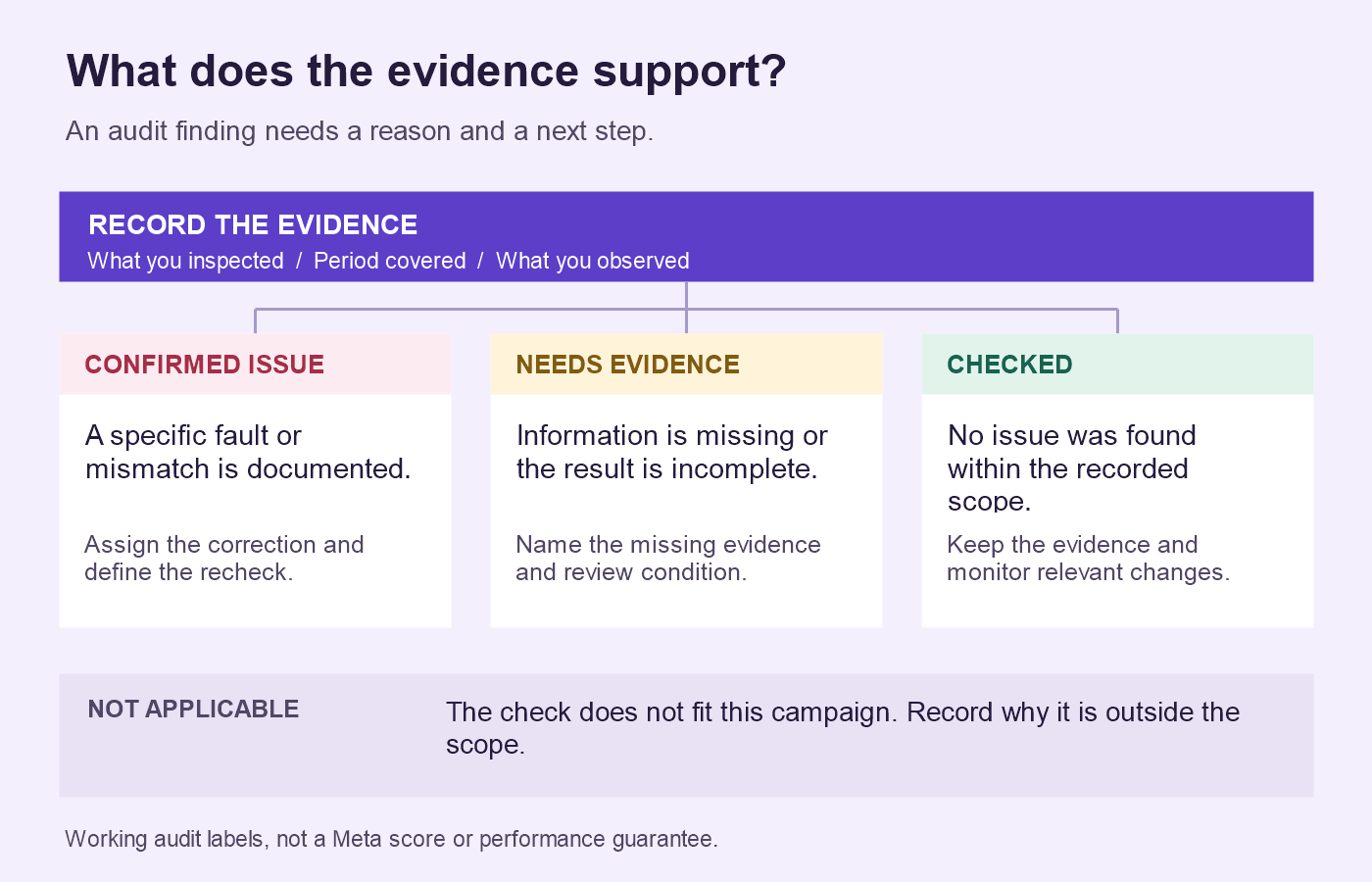
Give each check one status and a short note:
- Checked: inspected, with no issue found within the recorded scope.
- Confirmed issue: evidence shows a specific fault or mismatch.
- Needs evidence: information is missing or too incomplete for a conclusion.
- Not applicable: the check does not fit this campaign's purpose or setup.
These are working labels for your audit, not Meta ratings. Keep the reason beside the label. “Checked” does not certify future performance, and “needs evidence” must name what you need next.
Verify tracking and reporting before judging performance
4. Check that the intended result is recorded
Trace a known action through the relevant records. Does a completed purchase generate the intended purchase event? Does a submitted lead appear where the team expects to receive it? Check the step that actually matters, rather than assuming a page visit represents completion.
For website tracking, inspect the relevant data source in Events Manager. For forms or messages handled inside Meta, check the submission or conversation and its business follow-up. If you cannot trace an action, record the missing evidence and assign the investigation.
5. Inspect event coverage, quality, and freshness
Where website or server tracking is used, review the events received, their timing, and any diagnostic warnings. Check sample values and currencies against the underlying action. If browser and server integrations both send the same action, inspect whether it is being deduplicated rather than counted twice.
Meta's Conversions API training identifies coverage, quality, deduplication, and freshness as areas to monitor. Use those categories to structure the check; a single quality score cannot establish that all purchase records are correct. Give the integration owner the affected event and examples to investigate.
6. Compare reporting on a consistent basis
Record the attribution settings and metric definitions used in each report. Compare the same campaign scope and explain differences in dates, outcomes, currencies, and attribution before calling a discrepancy a tracking failure.
Definitions can change. In March 2026, Meta announced a staged change to click-through attribution for website and in-store conversions, narrowing it to link clicks and recategorizing other interactions. Check the definitions applicable to the periods you compare. The announcement does not establish when a specific account changed. Meta's measurement announcement
For website traffic, inspect campaign URL tags. Consistent utm_source, utm_medium, and utm_campaign values help identify referred traffic in Google Analytics. Test the actual destination and confirm that its tagging matches your naming convention. Google's campaign URL guidance
Neither URL tags nor an attributed conversion total prove how many sales happened because of advertising. Meta identifies incrementality experiments such as Conversion Lift as an approach to that causal question in its measurement announcement. Keep that distinction in the audit's conclusions.
Check campaign objectives, structure, and spending controls
7. Match the objective to the business outcome
Compare the campaign objective, optimization choice, and reported result with the business brief. If the business needs qualified inquiries but the campaign is evaluated only by link clicks, document that mismatch. A cheap click answers a different question from a useful lead.
Traffic or engagement can be legitimate goals. Judge them by their stated purpose and record any additional evidence needed before claiming a sales effect.
8. Inspect structure and recent changes
Look for campaigns or ad sets with no clear role, fragmented activity, delivery problems, or repeated edits. Review what changed and when before attributing a performance shift to the creative or audience.
Meta includes account simplification and results validation in its Performance 5 guidance. That supports asking whether the structure serves a purpose; it does not prescribe one campaign count for every account. Record the reason for a proposed consolidation and what evidence would support it. A learning-status label alone is not a business verdict.
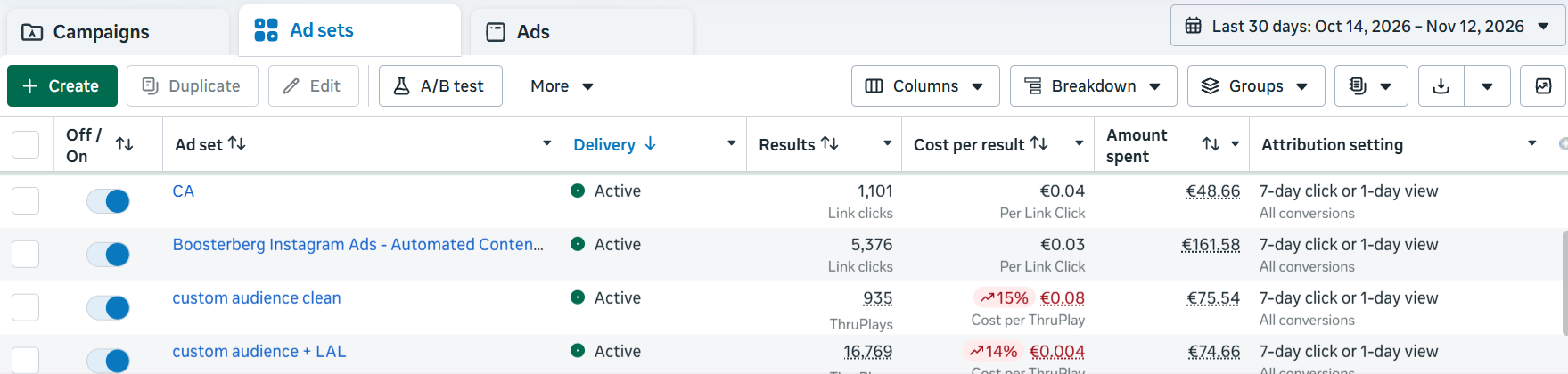
9. Inspect the controls behind the spend
Identify where the budget is set, the schedule, and any bid or cost controls. Compare intended allocations with actual spending over the relevant period. Check whether several live campaigns together exceed the allocation their owner intended.
Keep three questions separate: what was allocated, what was spent, and what each useful result cost. For budget minimums and setup-specific constraints, see the Meta ads minimum daily budget guide.
Follow the ad through the audience, creative, and conversion journey
10. Check who the business can serve
Review selected locations and the audience controls available in the actual setup. Compare them with shipping areas, service coverage, and customer eligibility. Check whether intended exclusions are present and still serve a business purpose.
An overlapping audience is a reason to inspect campaign roles and delivery. It does not, by itself, quantify wasted spend.
11. Preview the placements receiving delivery
Look at where spend is going, then preview the relevant creative. Check cropping, readable text, captions, the offer, and the action button. Follow the destination from that ad.
Fix a confirmed presentation problem before deciding that the placement itself cannot work. Sparse conversion data from one placement may be insufficient to support exclusion.
12. Investigate creative response over time
Compare creative concepts and their delivery histories. Are you testing different customer problems, offers, or demonstrations, or mostly small variations of the same idea?
Rising frequency alongside falling response and worsening business results warrants investigation. Check changes in audience mix, offer, destination, and measurement before concluding that fatigue is the cause. Record the hypothesis and the next creative test; avoid replacing every ad because it reached an arbitrary age.
13. Open the exact destination
Use the destination configured in the ad. On mobile, check that the product or offer is available, the price and terms are consistent, and the next action is easy to find. Test any redirect and campaign tags.
An ad for a specific offer should lead to a place where someone can understand and act on that offer. Save evidence of a mismatch so the person fixing it can reproduce the problem.
14. Complete the intended action
Following the business's test procedure, check the checkout, form, booking flow, or message route. Label test records so they do not contaminate customer reporting.
Verify the handoff as well as submission. A form confirmation does not tell you whether the inquiry reached the responsible person. Record where the action stopped and who owns that step.
15. Inspect outcome quality
For sales, examine the relevant order records and how cancellations or refunds affect the business's assessment. For leads, check qualification, contactability, response handling, and eventual customer outcomes.
Use consistent criteria and comparable follow-up time. If lead quality is unknown, the audit should say so. It should also name the person responsible for connecting the advertising result to the business outcome.
Include boosted posts and the rules that launch them
16. Find the reason each post received paid support
Sample recent promoted posts and trace the selection decision. Was there a documented manual reason, an engagement threshold, a time window, or another rule? Inspect whether the post still fits the audience and intended outcome.
Organic response can help shortlist content. It does not establish that paid distribution will generate profitable purchases. Check relevance and the next action alongside popularity.
17. Review concurrent promotions
Map active promotions to their posts, pages, dates, and allocated budgets. Look for accidental repeat launches, expired offers, or overlapping schedules that the owner did not intend.
Repeated use of a post may be deliberate. Confirm the purpose before removing anything. The audit finding should describe the actual mismatch, such as two allocations where the owner intended one.
18. Check stopping conditions and rule ownership
Review what is meant to stop or change each promotion, who owns those settings, and whether the observed activity matches the intended behavior. Where native and third-party rules affect the same campaigns, inspect their combined effect.
Record the relevant rule and activity evidence. Do not assume a stopping condition guarantees an instantaneous spending ceiling. If behavior is unclear, assign the check to the person responsible for that automation before changing several rules together.
Turn audit findings into a prioritized action plan
Prioritize confirmed operational failures affecting active delivery, then measurement problems that prevent sound decisions. Next, investigate performance questions and plan tests. Consider the affected activity, severity, confidence in the finding, effort, and dependencies.
A tracking issue may block a conclusion about profitability without requiring every unaffected campaign to stop. Likewise, incomplete results are not a reason to keep spending without a boundary: record the owner's spending limit and review condition.
Three findings, three different decisions
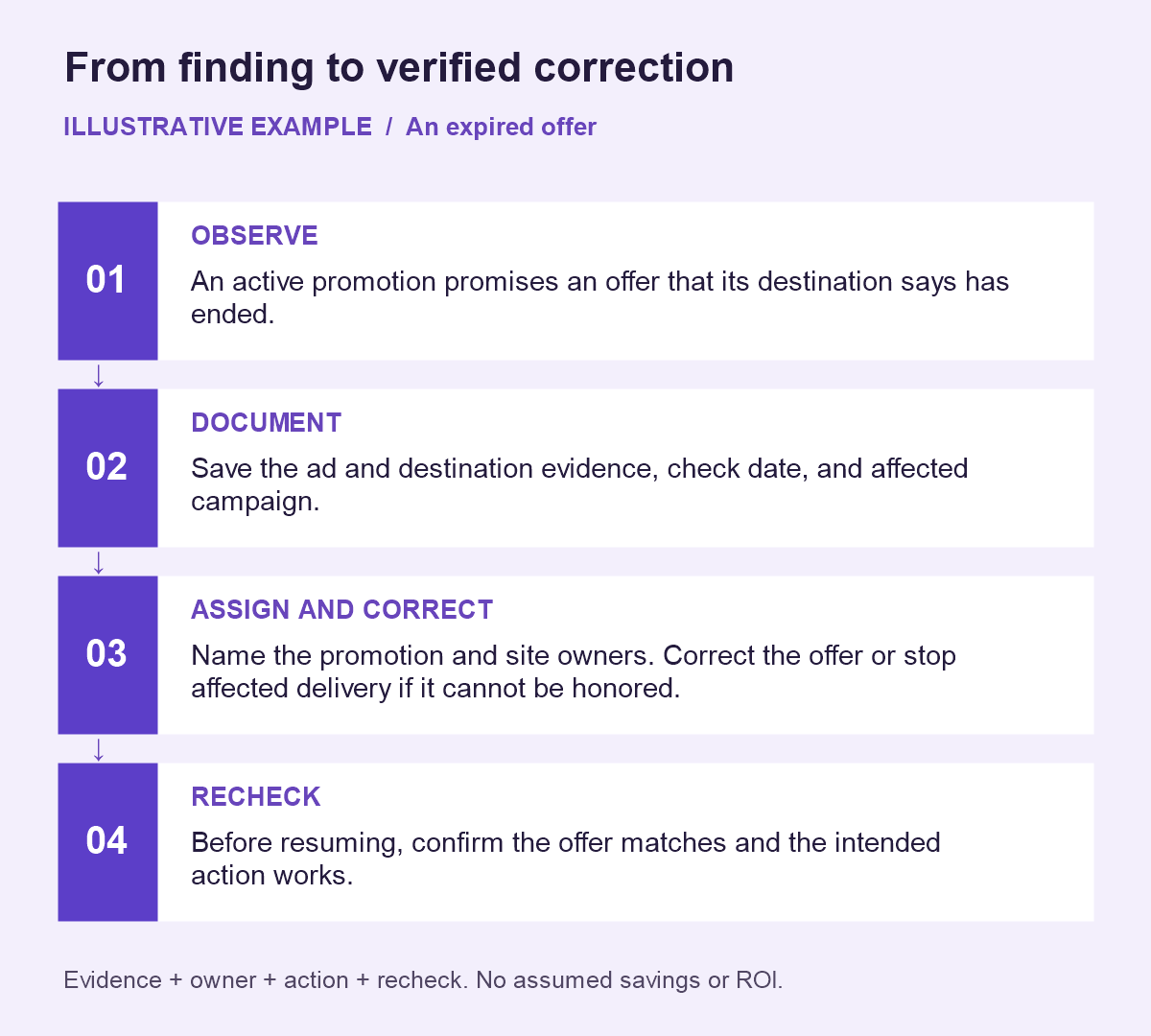
Illustrative example: an expired offer. An active promotion promises an offer that its destination says has ended. This is a confirmed mismatch. Save the ad and destination evidence, then correct the affected promotion or destination. If the offer cannot be honored, stop sending people to it while it is resolved. Recheck the full path afterward.
Illustrative example: no purchases yet. A report covers a short interval, while account history shows that customers often purchase later. Verify measurement and delivery, then mark the performance conclusion “needs evidence.” Choose a review point informed by that observed delay and keep a spending boundary. Waiting does not guarantee purchases will arrive.
Illustrative example: cheap leads, uncertain value. USD 600 produces 40 recorded leads, of which four meet the business's documented qualification criteria after equivalent follow-up. That is USD 15 per recorded lead and USD 150 in ad spend per qualified lead. Both calculations can be correct. Profitability remains unknown without customer outcomes and business economics. If qualified leads are the goal, include that denominator in the decision.
Copy this audit action table
Keep a named person and a date or observable condition against each action. The row below illustrates the format; replace it with your own evidence.
| Finding | Evidence and period | Status | Proposed action | Owner | Recheck condition |
|---|---|---|---|---|---|
| Active promotion links to an expired offer | Ad and destination captures; record check date and affected campaign | Confirmed issue | Correct the offer/destination; stop affected delivery if it cannot be honored | Name the promotion owner and site owner | Before resuming, verify the promised offer and complete the intended action |
Retain checked items and the reasons for leaving them unchanged. An audit should preserve useful decisions as well as identify repairs.
Make recurring post promotion easier to maintain
Run an audit when taking over an account and after material changes to tracking, the website, offers, or ownership. Set routine reviews around spending, campaign activity, and the time outcomes take to mature. Treat this as an operating schedule you choose, not a universal Meta requirement.
If recurring problems concern which posts get promoted, their budgets, and when they stop, consistent rules can make that process easier to maintain.
Boosterberg automates Facebook and Instagram post promotion through campaigns in your own Meta Ads Manager account. You define selection criteria, time windows, budgets, and stopping conditions. It applies those rules to recurring promotion; account strategy, measurement repairs, and customer follow-up remain with your team.
See how automated post boosting works. To apply consistent rules to your own promotion workflow, try Boosterberg.
Frequently asked questions
What is the difference between a Facebook ads audit and a pre-launch checklist?
A pre-launch checklist checks whether a campaign is ready to run. An audit examines an existing account's setup, delivery, measurement, and outcomes. Some checks overlap, but an audit also uses historical activity and business records to decide what needs attention.
How much data do I need before auditing an account?
You can inspect access, settings, destinations, and broken actions immediately. Performance conclusions require enough relevant, mature evidence to answer the question. Consider result volume, spend, conversion delay, and lead follow-up time. Record uncertainty instead of applying one minimum sample to every campaign.
Can I audit Facebook ads without paying for an audit tool?
You can perform the checks manually using the account's reporting and settings, relevant business records, and a document or spreadsheet. Tools may help organize evidence, but missing access or business context still needs resolving. This checklist does not require a paid audit product.
Does this checklist cover Instagram ads and boosted posts?
Yes. Include the relevant Instagram delivery and promoted-post campaigns in your review, and inspect their specific creative, goals, destinations, and rules. Keep platform-specific findings visible where useful rather than assuming an account-level total describes every promotion equally well.