
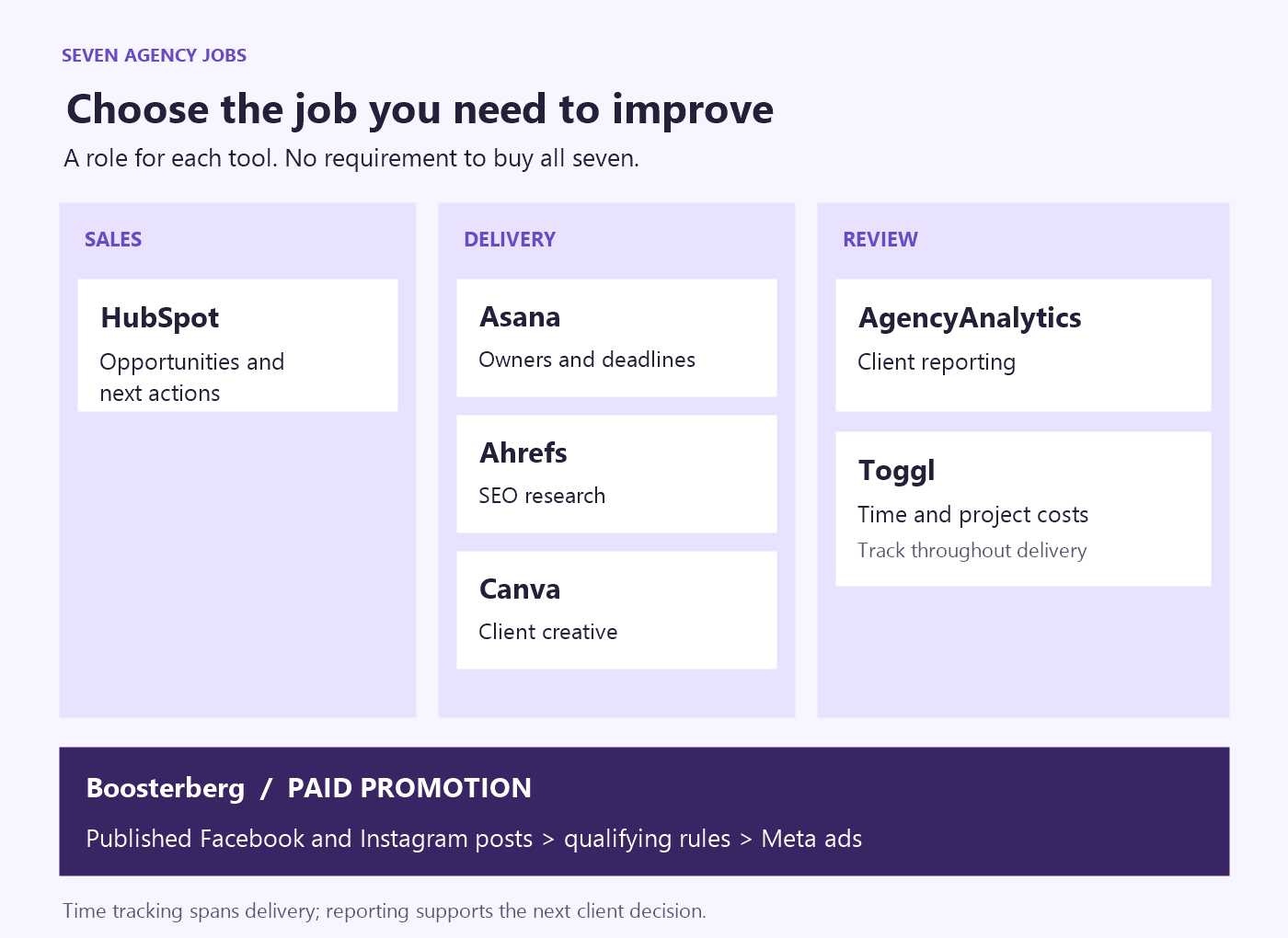
Our seven recommended tools for digital agencies are HubSpot, Asana, Ahrefs, Canva, Boosterberg, AgencyAnalytics, and Toggl. Each earns its place through a different job: managing opportunities, organizing delivery, researching SEO, creating assets, promoting social posts, reporting results, or tracking delivery time.
Choose according to the work your team needs to improve. An agency missing client deadlines needs a different fix from one spending hours rebuilding reports.
The seven agency tools at a glance
| Agency job | Tool | Useful output | When to skip adding it |
|---|---|---|---|
| Manage new business | HubSpot | Opportunities with clear next actions | Your existing CRM already supports reliable follow-up |
| Coordinate delivery | Asana | Client tasks with owners and deadlines | Your current project system gives the team that visibility |
| Research SEO | Ahrefs | Research and site findings to prioritize | SEO is outside your services, or another suite covers it |
| Produce creative | Canva | Reusable assets aligned with each client's brand | Your design workflow already handles recurring production well |
| Automate paid post promotion | Boosterberg | Eligible social posts promoted under agreed rules | Paid boosting is occasional or outside your scope |
| Report to clients | AgencyAnalytics | Repeatable reports across supported data sources | Existing reports already answer clients' questions efficiently |
| Track delivery effort | Toggl | Time records and project cost visibility | Your project software already provides sufficient time reporting |
We selected these digital marketing agency tools to cover recurring work across sales, delivery, and review. There is overlap between products; a useful agency stack gives each system a clear responsibility.
This is also a selective list. Your agency may still need email, file storage, accounting, website tools, organic publishing, and the underlying advertising and analytics accounts.
1. HubSpot for managing your agency's sales pipeline
If proposals disappear into email threads, start with the sales record. HubSpot's CRM brings contacts, communication history, deals, and follow-up tasks together. Its role here is managing your agency's opportunities, rather than running every client's marketing.
For example, a prospective client might move through discovery, proposal sent, and decision pending. The useful record includes what they want, who owns the opportunity, and the next agreed action. Your sales lead should be able to see whether someone is waiting for a revised scope or has simply not been contacted.
Test it with a real opportunity: can a colleague take over the next conversation without searching through someone else's inbox? That is a more useful buying test than counting CRM features.
HubSpot offers free CRM functionality alongside paid products and tiers. Check what your intended workflow requires before assuming that advanced automation or reporting is included. If an existing CRM already gives your team reliable follow-up, improving how you use it may be more valuable than migrating.
2. Asana for keeping client work on schedule
Asana organizes projects and tasks with owners, due dates, and different views of the work. Use it to make a client deliverable's next step visible to everyone involved.
Consider a campaign that needs a brief, copy, design, client review, and launch. “Campaign due Friday” is too broad to show where work is stuck. Separate tasks let the account manager see whether the designer is waiting for approved copy or the launch owner is waiting for a client decision.
Keep the current brief and asset locations accessible from the relevant tasks. Record who is responsible for collecting approval; a completed internal task should not be mistaken for client sign-off.
The test is simple: can the account manager identify the blocked deliverable and the person who can move it forward? If the team still relies on private messages to answer that, the workflow needs attention.
Asana also offers time tracking. Check your plan and reporting needs before adding a separate tool for that job. Its project features and advanced options vary by plan, so evaluate the workflow you intend to run, including how clients will participate.
3. Ahrefs for SEO research and site checks
Ahrefs brings together tools including Keywords Explorer, Site Explorer, Site Audit, and Rank Tracker. For an agency delivering SEO, these support research, technical investigation, and monitoring search visibility.
Imagine taking over a client's service website. The SEO specialist needs to understand the topics customers search for, inspect relevant competing pages, and investigate site issues. The useful output is a prioritized set of recommendations with a reason for each, not an untouched export of every keyword or warning.
Assign the resulting work in your delivery system. An issue found during research still needs an owner, a proposed change, and a way to check whether the change helped.
Keep research estimates separate from the client's own measurement. Estimated competitor traffic does not establish how many inquiries your client received, and a ranking change alone does not establish commercial impact.
Ahrefs earns consideration when SEO research is recurring client work. If another suite already provides the research and checks your team needs, test the specific missing capability before paying for a second subscription. For an agency that does not deliver SEO, this slot may be unnecessary.
4. Canva for producing consistent client creative
Canva's Brand Kits organize brand assets such as logos, colors, and fonts. Brand Templates provide a reusable starting point for designs. Together, they can support recurring production across client brands, subject to the features available on your plan.
A practical example is a series of service explainers. Your designer establishes the layouts and visual hierarchy; the content team adapts the approved templates for new topics. Keep each client's assets clearly separated and identify the version approved for use.
Test the process by asking someone other than the original designer to produce the next asset. Can they find the right template, use the correct brand elements, and leave it ready for review?
Templates do not decide whether the message is persuasive or whether an image fits the campaign. Creative direction and a final check remain necessary. Confirm the availability of brand controls and team permissions instead of assuming they come with every account.
Canva fits recurring visual production. If your designers already have an efficient process for that work, introduce it only where it improves a specific handoff or production task.
5. Boosterberg for automating paid social post promotion
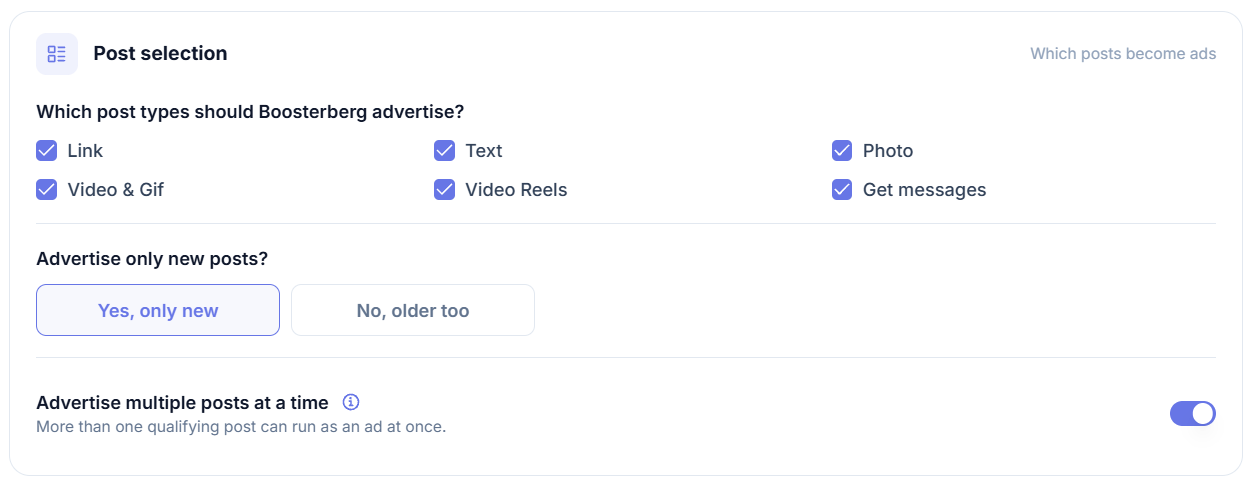
Boosterberg watches Facebook and Instagram posts and turns qualifying content into Meta ads using rules your team defines. The campaigns live in your own Meta Ads Manager account.
For an agency handling regular client publishing, the recurring job is deciding which posts receive paid support and applying the agreed spending controls. Boosterberg lets you encode selection criteria, timing, budgets, and stopping conditions instead of repeating the setup for each qualifying post.
As an illustrative workflow, a social lead identifies the types of published content eligible for promotion. The paid-media owner then configures the promotion criteria and budget boundaries. The team reviews the resulting campaigns against the client's objective and adjusts the rules when necessary. An engagement threshold is a selection signal; it does not prove that a post will generate sales.
This is paid-promotion automation. Boosterberg does not create your content calendar, publish organic posts, or manage social conversations. Meta ad spend is separate from the software subscription, and strategy remains with your team.
Read how automated post boosting works for the detailed workflow. Boosterberg is worth considering when eligible posts need paid support regularly; occasional manual promotions may not justify another tool.
6. AgencyAnalytics for recurring client reports
AgencyAnalytics provides dashboards, automated client reports, white-label options, and connections to supported marketing data sources. Its role is organizing recurring reporting across the channels your agency manages.
Suppose an account manager rebuilds the same report every month. Start with the questions the client needs answered: what happened, how that compares with the agreed objective, and what the agency recommends next. Then check that the necessary data sources and metrics are available.
Build a reporting template around those questions. Leave space for explanation when a campaign changes, data is incomplete, or results need more time to mature. A dashboard cannot supply that context on its own.
Before adopting the tool, compare a sample report with the original sources. Check date ranges, metric definitions, and account selection. Combining figures on one page does not automatically make them comparable.
AgencyAnalytics becomes useful when recurring reporting across channels creates enough work to warrant a dedicated system. If clients receive a clear, reliable report from your existing tools, keep that arrangement. Verify the connectors and reporting capabilities you need rather than assuming every platform or metric is supported.
7. Toggl for tracking delivery time and project costs
Toggl supports time entries, reports by client or project, billable rates, and cost/profitability reporting. It gives an agency a way to inspect the effort behind its deliverables, with availability depending on the chosen plan.
For a hypothetical monthly retainer, track work under meaningful categories such as production, revisions, reporting, and account management. The delivery lead can then investigate why one client consistently needs more effort than the agreed scope anticipated.
Use that evidence to review the process or scope with the account owner. Extra revision time might reflect an unclear brief, several rounds of stakeholder feedback, or work that was never included in the agreement. The time record helps locate the question; it does not answer it by itself.
Useful reports depend on consistent entries and appropriate cost inputs. Revenue alone is not profit, and tracking hours does not guarantee improved margins.
Before adding Toggl, check whether your existing project system already gives you enough visibility. If it does, agree on a reliable tracking habit there. A separate tool earns its place when it provides information your delivery and account leads will actually use.
How these tools fit into one client engagement
Consider an illustrative agency engagement covering SEO content and paid social promotion. This is a hypothetical workflow, not a customer case study or a claim that all seven products connect automatically.
The sales lead records the agreed scope and next actions in HubSpot. Once the work is won, the account manager creates the delivery brief and tasks in Asana. Someone must carry the agreed scope into that brief and confirm that nothing was lost in the handoff.
The SEO specialist uses Ahrefs to develop research recommendations. The designer prepares client assets in Canva. Both outputs return to the delivery workflow for review. Publication happens through the agency's existing publishing process.
After eligible social content is published, the paid-media owner uses Boosterberg's configured rules for promotion. The account manager prepares a client report in AgencyAnalytics using supported sources, checks the figures, and adds recommendations. Toggl records delivery time across the engagement so the team can review effort alongside scope.
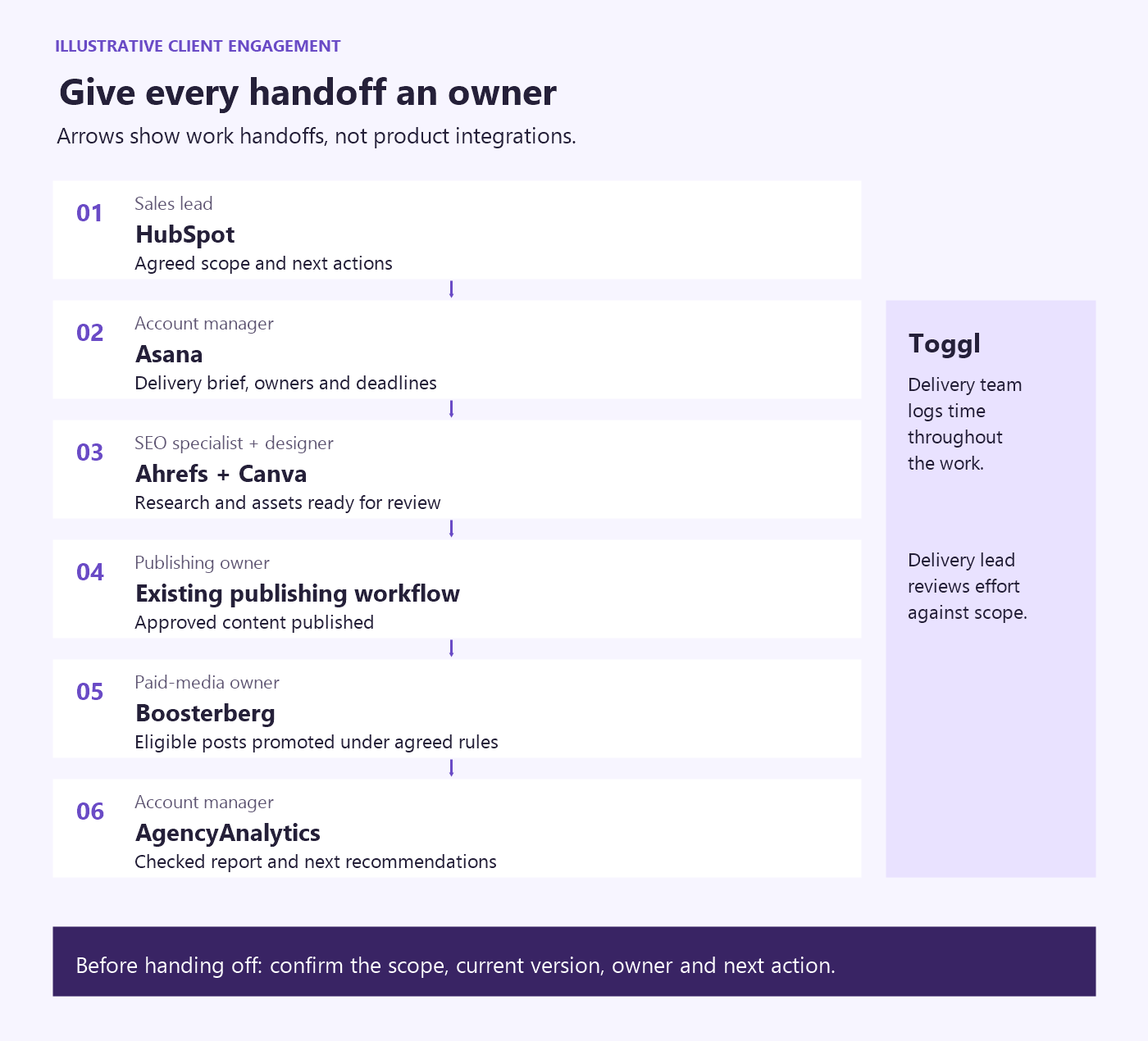
The important decision is where each record belongs. Keep the sales agreement, delivery status, approved creative, campaign results, and time records identifiable. Avoid creating several competing versions of the same brief just because several tools can store it.
Choose the next tool your agency actually needs
Start with one recurring problem you can describe concretely: proposals without follow-up, campaigns delayed during review, reports rebuilt by hand, or retainers with unexplained delivery effort.
Before adding software, check whether your current tools already support the missing step. A task without an owner or a report without a clear purpose may require a process decision first.
Then test one client workflow. Give the test an owner and a useful output: a proposal pipeline another colleague can understand, a campaign board showing blocked work, or a report ready for account-manager review. Compare the result with your previous process, including setup effort and ongoing maintenance. Keep the tool only if it improves the work enough to justify those costs.
Check the commercial details against that actual workflow. Count the required seats and client accounts, confirm the feature tier, inspect client permissions, and test needed exports and connectors. Include onboarding and maintenance time in the decision. For paid promotion, budget media spend separately.
Your digital agency tech stack should reflect the services you deliver. Add a capability when you have a clear use for it and someone responsible for making it work.
Frequently asked questions
Does a small digital agency need all seven tools?
No. Use the list to identify functions that matter to your services and current bottlenecks. A small team may cover several jobs with existing software or a simple shared process. Add specialist tools when the recurring work justifies them.
Can one platform cover several agency jobs?
Yes. Project software may also track time, and research tools may provide sufficient reporting for some clients. Compare the capabilities you actually need, then decide whether a specialist tool improves the output enough to justify another subscription and handoff.
Does social media automation include scheduling and paid promotion?
The term covers different activities. Scheduling publishes organic content; paid-promotion automation puts advertising spend behind eligible posts. Boosterberg focuses on the latter. If you also need publishing and inbox management, consider that separately; our social media platform comparison explains the distinction.
Automate the recurring promotion work
If your agency already publishes client content and repeatedly selects posts for paid Facebook and Instagram promotion, try Boosterberg. Set the promotion criteria and spending controls around your client's goals, then review the campaigns in Meta Ads Manager.